
SGOU Student Login: Learner Portal, ABC ID and DEB ID
Contents
- SGOU Alerts & Notifications
- SGOU Student Login: July-August 2026 Session Notice
- SGOU Learner Portal: ERP Student Access and Overview
- SGOU Student Login: Important Portal Highlights
- How to Complete SGOU Student Portal Login?
- SGOU Academic Portal: Services and Details Available
- How to Generate SGOU ABC ID and APAAR Student Account?
- How to Generate SGOU DEB ID on UGC Portal?
- SGOU Fee Payment Gateway: Online Charges and Modes
- What to Do if SGOU Login Password or Payment Receipt Fails?
- SGOU Learner Support Centres: Contact Directory across Kerala
- SGOU Candidate Portal Access: Next Steps for Distance Learners
- Where to Go on the SGOU Site
- Notices and Documents from SGOU
- Common SGOU Questions
- In this section
SGOU student portal login requires a registered email ID and an 8-character minimum password. Learners must create an ABC ID on abc.gov.in using Aadhaar verification for the 2025/2026 session. A unique UGC DEB ID must be generated at deb.ugc.ac.in using the student’s ABC ID. Online fee payments via Debit Card, Net Banking, UPI, and Credit Card carry zero transaction charges. Mandatory document uploads include photo, signature, ID proof, and Transfer Certificate for learners under 45 years.
Sreenarayanaguru Open University (SGOU), also known as Sree Narayana Guru Open University, manages student admissions, fee payments, and academic services through its dedicated digital portals. Enrolled distance learners in the 2026 July-August academic session must access the candidate portal at erp.sgou.ac.in to manage profiles, view learning materials, and submit semester examination applications. Additionally, all undergraduate and postgraduate learners are required to generate an Academic Bank of Credits (ABC) ID and a Distance Education Bureau (DEB) ID to validate their enrolment under University Grants Commission (UGC) regulations.
SGOU Student Login: July-August 2026 Session Notice
Sreenarayanaguru Open University (SGOU) has released academic updates for the 2026 July-August admission session (Intake-I) across its Open and Distance Learning (ODL) programmes. Enrolled learners were required to attend the mandatory induction session held at 10:00 AM on 27 September 2026 at designated Learner Support Centres (LSCs).
Applications were invited for UGC-DEB recognized 3-Year Undergraduate (UG) programmes across ten streams, 4-Year UG Four Year Undergraduate Programmes (FYUGP) across six streams, and 2-Year Postgraduate (PG) programmes across fourteen streams for the 2026-2027 academic year.
Students enrolled in ongoing batches must monitor examination notifications published on the student portal. Sixth-semester regular examinations for 2023 July admission UG candidates and supplementary examinations for 2022 and 2023 admissions are scheduled for November 2026.
Key facts
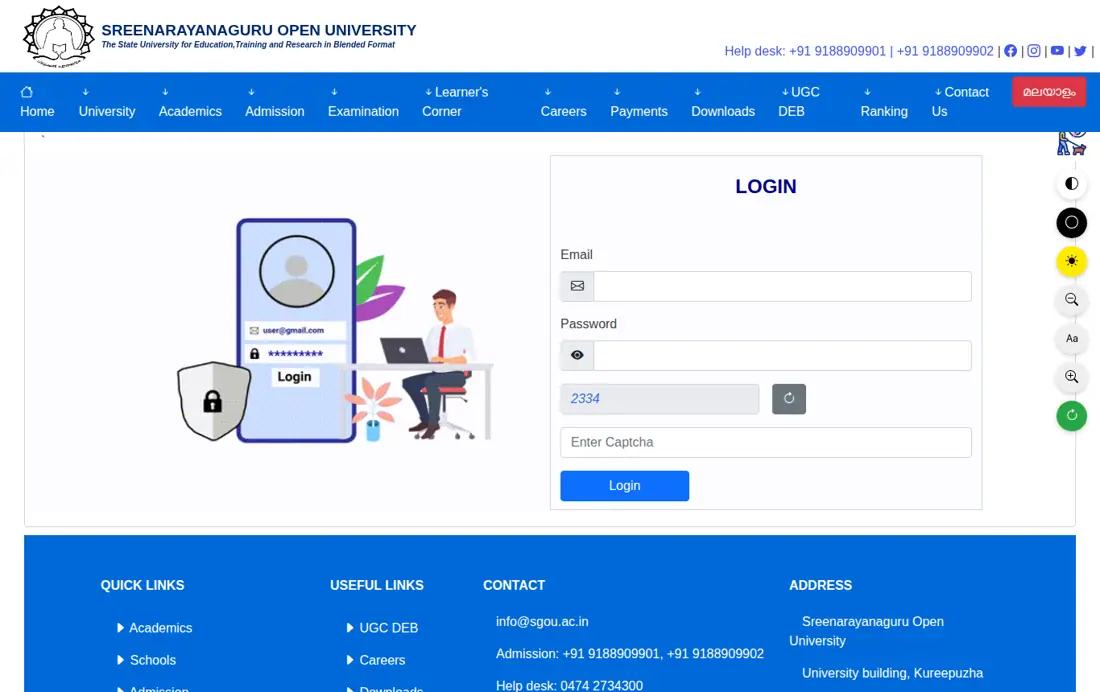
- Candidate Login Portal: erp.sgou.ac.in/login-candidate
- Official Main Website: sgou.ac.in
- ABC ID Portal: abc.gov.in
- DEB ID Portal: deb.ugc.ac.in/StudentDEBId
- Password Requirement: Minimum 8 characters
- Payment Charges: NIL (Rupay, UPI, Net Banking)
- Help Desk Hours: 10 AM to 5 PM
SGOU Learner Portal: ERP Student Access and Overview
The SGOU Candidate Login portal provides digital access for distance learners to complete profile details, submit course applications, pay semester fees, and track academic records. Every applicant receives system credentials including an OTP, username, and password upon registering on the admission management platform.
Learners must access the portal through SGOU candidate login portal or navigate via the SGOU student corner page. Confidential credentials must not be shared to prevent unauthorized changes to profile documents or study centre choices.
- Candidate Login URL: erp.sgou.ac.in/login-candidate
- Official Admin Login URL: erp.sgou.ac.in/login-official
- Primary Services: Admission profile completion, document upload, programme fee payment, and examination form submission
- Security Feature: Password length must be at least 8 characters with reCAPTCHA verification
SGOU Student Login: Important Portal Highlights
The Enterprise Resource Planning (ERP) portal of SGOU centralizes student services, fee processing, and administrative communications for all distance education batches. Learners can review key login links and technical specifications below before accessing their accounts.
Candidates should ensure their mobile number and email ID remain active throughout the programme duration to receive automated portal alerts and OTP verification messages.
SGOU Digital Portals and Access Highlights
| Portal Service | Official Website Link | Required Login Credentials | Key Functions Available |
|---|---|---|---|
| Candidate / Student Portal | erp.sgou.ac.in/login-candidate | Registered Email ID & Password | Profile edit, fee payment, programme application |
| Official / Counsellor Portal | erp.sgou.ac.in/login-official | Official Email ID & Password | Administrative and LSC staff verification |
| Student Corner Hub | sgou.ac.in/student-corner | Public Access / Student Credentials | SLM download, syllabus, grievance, E-Grantz |
| UGC DEB ID Portal | deb.ugc.ac.in/StudentDEBId | Generated ABC ID | Distance learner verification ID creation |
Other SGOU services students check
How to Complete SGOU Student Portal Login?
Enrolled students and new applicants can log into the SGOU portal by navigating to the candidate login page on any standard desktop or mobile web browser. Ensure that your password meets the minimum security length of 8 characters.
Follow these exact steps to complete candidate authentication on the SGOU ERP platform:
- Open the official SGOU candidate login portal at erp.sgou.ac.in/login-candidate.
- Enter your registered Email Address in the designated input field.
- Type your Password (must be at least 8 characters long).
- Complete the reCAPTCHA security verification box.
- Click on the ‘Login’ button to open your student dashboard.
SGOU Academic Portal: Services and Details Available
Once logged into the dashboard, candidates can view tabs for UG Programme and PG Programme details, including overview, outcome, curriculum, and fee structures. The portal also features digital links for learning resources, self-learning materials (SLM), examination forms, and grievance submissions.
Applicants completing their profile after initial registration must fill academic qualifications and upload necessary supporting certificates in the prescribed image and document formats.
- Qualifications Required: 10th Level, Plus 2/Pre-Degree/HSE/Equivalent Level, and Degree/Equivalent Level details
- Photo & Signature Upload: Uses an image cropper tool supporting JPG, PNG, and JPEG formats
- Identification Documents: Aadhaar or listed photo identity proof number
- Transfer Certificate (TC): Mandatory for candidate applicants below 45 years of age
- Reservation Certificates: Caste, Income, or Non-Creamy Layer (NCL) certificate for eligible fee relaxation candidates
- Student Corner Resources: Virtual content, syllabus, anti-ragging affidavit registration, and E-Grantz portal access
How to Generate SGOU ABC ID and APAAR Student Account?
Under UGC guidelines, every student enrolling in SGOU ODL programmes must create an Academic Bank of Credits (ABC) ID to generate their Automated Permanent Academic Account Registry (APAAR) ID. This digital identity stores academic credits earned across semesters.
Follow these step-by-step instructions to create your ABC ID online:
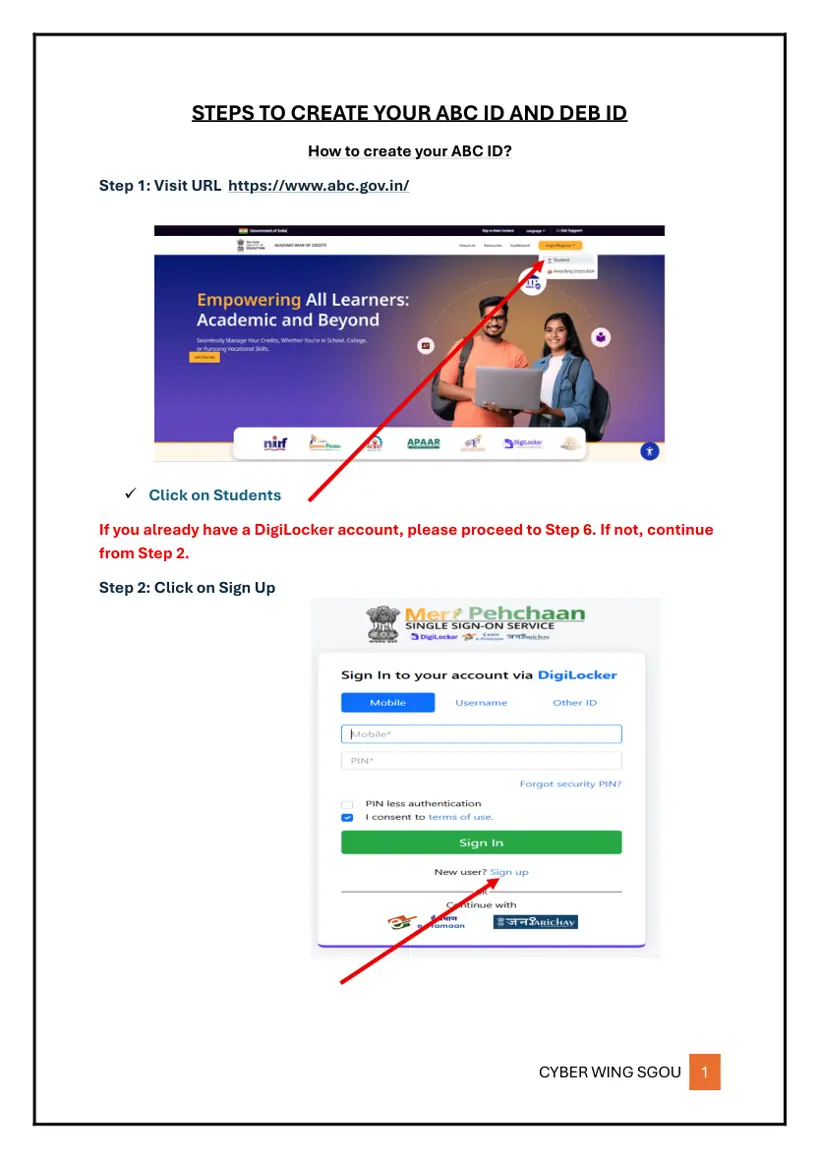
- Visit the official ABC portal at www.abc.gov.in and click on ‘Students’.
- Click on ‘Sign Up’ (or proceed to sign in if you already hold a DigiLocker account).
- Enter your mobile number, click ‘Generate OTP’, enter the received code, and click ‘Verify OTP’.
- Set up personal information by selecting document type as Aadhaar, entering Aadhaar number, Name, Date of Birth, Gender, Username, and Security PIN, then click ‘Verify’.
- Sign in using Aadhaar number and Security PIN, consent to terms, and click ‘Sign In’.
- Click on the ‘Allow’ button to grant consent for account access.
- Fill out the registration form: select Identity Type as ‘New Admission’, select institution as ‘Sreenarayanaguru Open University’, and enter Admission Year as 2025.
- Click on ‘Submit’ to generate your APAAR / ABC ID student account and view your detailed dashboard.
How to Generate SGOU DEB ID on UGC Portal?
Distance education learners at SGOU must generate a Distance Education Bureau (DEB) ID on the official UGC DEB web portal before finalizing admission. The DEB ID verifies that the student is enrolled in a recognized ODL programme.
Execute the following steps to obtain your UGC DEB ID:
- Navigate to the official UGC DEB student ID creation URL at deb.ugc.ac.in/StudentDEBId.
- Enter your previously generated 12-digit ABC ID in the provided field.
- Click the ‘Enter’ or Submit button.
- View and download your generated DEB ID displayed on the confidential screen.
SGOU Fee Payment Gateway: Online Charges and Modes
SGOU processes all application, semester, and service fee payments digitally through an integrated online payment gateway. Candidates can complete transactions using credit cards, debit cards, net banking, or Unified Payments Interface (UPI).
The university levies zero additional transaction charges across standard domestic digital payment methods. Review the official gateway rate breakdown below:
SGOU Online Fee Payment Modes and Transaction Charges
| Payment Type / Method | Transaction Charge / Service Rate |
|---|---|
| Rupay Debit Card | NIL |
| Other Debit Cards (up to Rs 2000) | NIL |
| Domestic Credit Card | NIL |
| Net Banking | NIL |
| UPI (Unified Payments Interface) | NIL |
What to Do if SGOU Login Password or Payment Receipt Fails?
Learners encountering authentication errors or payment confirmation failures must follow prescribed university helpdesk protocols rather than submitting duplicate fees. Profile editing is disabled once candidate documents are verified by SGOU officers.
Refer to the standard troubleshooting procedures for common login and transaction issues:
- Forgotten Password: Click on the ‘Forgot password?’ link on the candidate login page at erp.sgou.ac.in/login-candidate to reset your login key.
- Missing Payment Receipt: If money is deducted but no receipt is generated, contact the SGOU university office before attempting another transaction.
- Fee Refund Requests: Contact the main SGOU university office directly for fee refund or cancellation queries.
- Profile Editing Limits: Profile details can be modified before verification; after verification, edit options are locked automatically.
- Technical Help Desk: Contact administrative support between 10 AM and 5 PM on working days.
SGOU Learner Support Centres: Contact Directory across Kerala
SGOU operates Learner Support Centres across regional hubs in Thalassery, Kozhikode, Pattambi, Ernakulam, and Head Quarters Kollam to assist students with offline counseling and induction. LSC Coordinators are available by telephone between 10 AM and 6 PM.
Review key contact details for select regional support centres listed in the university directory:
SGOU Learner Support Centres Contact List
| Learner Support Centre (LSC) | Regional Centre Hub | Coordinator Name & Phone (10 AM – 6 PM) | Official Contact Email ID |
|---|---|---|---|
| Malik Deenar College, Kasaragod | Thalassery | Kiran Raj (9482474988) | sgoulsc.mdcgsksg@gmail.com |
| Mahatma Gandhi College, Iritty, Kannur | Thalassery | Sebin George (9446111167) | sgoulsc.ity@mgcollege.ac.in |
| M Dasan Arts & Science College, Kozhikode | Kozhikode | Subin Prakash K K (9745378347) | sgoulscmditarts@gmail.com |
| Royal College of Arts & Science, Thrithala | Pattambi | Muhammed Anas MK (8606877636) | royalcsa@gmail.com |
| Nirmala Arts & Science College, Ernakulam | Ernakulam | Eldho Peter (9645156351) | sgoulsc.nascmulanthuruthy@nirmalacollegemty.edu.in |
| TK M College of Engineering, Kollam | Head Quarters | Dr. Vishnu D. (9497361144) | sgoulsc.tkmcekollam@gmail.com |
SGOU Candidate Portal Access: Next Steps for Distance Learners
Distance learners enrolled in Sreenarayanaguru Open University must immediately verify their portal access at erp.sgou.ac.in/login-candidate and complete ABC ID generation on abc.gov.in. Ensure your DEB ID is submitted on the portal to finalize official enrollment records for the 2026 July-August academic session.
Keep your registered mobile number active, generate payment receipts after every fee transaction, and contact your assigned Learner Support Centre coordinator for academic guidance.
Common SGOU Questions
Did Sree Narayana Guru open university?
Yes, Sreenarayanaguru Open University (SGOU) was established by the Government of Kerala as a dedicated state open university. It offers UGC-DEB recognized 3-Year UG, 4-Year FYUGP, and 2-Year PG degree programmes in distance education mode.
What distance education courses are offered at Sree Narayana Guru Open University?
SGOU offers 10 three-year UG programmes, 6 four-year FYUGP programmes, and 14 two-year PG programmes in distance mode for the 2026 July-August session. Offered courses include BA, BCom, BBA, MA, MBA, and MCA.
How do I access the sreenarayanaguru open university candidate login?
Open erp.sgou.ac.in/login-candidate on your web browser. Enter your registered email address, your password of at least 8 characters, complete the reCAPTCHA security check, and click Login.
What credentials are needed for www sgou ac in login password reset?
To reset your password on erp.sgou.ac.in/login-candidate, click on the ‘Forgot password?’ link. You must provide your registered email address to receive password recovery instructions.
How do SGOU students create an ABC ID on abc.gov.in?
Visit www.abc.gov.in, sign up using Aadhaar and mobile OTP, and set up your profile. Select ‘New Admission’, select ‘Sreenarayanaguru Open University’, and choose admission year 2025 to generate your APAAR/ABC ID.
How do I get a DEB ID for SGOU distance education enrolment?
Visit deb.ugc.ac.in/StudentDEBId after generating your ABC ID. Type your 12-digit ABC ID into the input field and click submit to view and save your official UGC DEB ID.
Are there extra processing charges for paying SGOU fees online?
No, SGOU charges zero transaction fee (NIL) for online payments made via Rupay debit cards, domestic credit cards, net banking, UPI, or debit cards up to Rs 2000.
What should I do if my SGOU online fee payment fails or receipt is missing?
If fee money is debited from your account but no confirmation receipt appears, do not retry payment immediately. Contact the SGOU university office to confirm receipt status or request a fee refund.
Where do Sreenarayanaguru Open University students log in, is it www.sgou.ac.in?
SGOU students should log in through the dedicated candidate portal at erp.sgou.ac.in/login-candidate. While sgou.ac.in is the official main university website, it is not the portal for student login. The ERP portal handles admissions, fee payments, and academic services for distance learners.
What is the official help desk address for Sreenarayanaguru Open University?
The official help desk address for Sreenarayanaguru Open University is http://www.content.sgou.ac.in/. This help desk operates from 10 AM to 5 PM. For specific academic guidance or offline support, students can also contact their Learner Support Centre (LSC) coordinators.
How can I verify my registration status on the Sreenarayanaguru Open University ERP portal?
After successfully applying for a program, candidates can view their application status through the student’s dashboard on the ERP portal. While the system processes verification, direct editing options are typically unavailable. Any necessary edits after verification require a request from the candidate to the university.
What documents must candidates upload on the Sreenarayanaguru Open University portal during admission?
Candidates must upload a passport-size photograph, scanned signature, photo identity proof, and a Transfer Certificate if under 45 years of age. Applicants seeking fee concessions must upload Caste, Income, or Non-Creamy Layer certificates. Qualification certificates for 10th, Plus 2, and Degree levels are also required.
Where to Go on the SGOU Site
- SGOU student corner resource hubsgou.ac.in ↗
- Learner Support Centre directory contact listsgou.ac.in ↗
- SGOU official counsellor login portalerp.sgou.ac.in ↗
- SGOU candidate login portalerp.sgou.ac.in ↗
- SGOU official contact pagesgou.ac.in ↗
Notices and Documents from SGOU
- SGOU User Manual for ABC ID and DEB ID Creation PDF — User Manual for creating ABC ID and DEB ID
- SGOU Online Admission Portal Applicant User Manual November 2022 PDF — SGOU Online Admission Portal Applicant User Manual
- SGOU UGC Public Notice ODL Online Learning Enrollment 2023 PDF — UGC Public Notice ODL Online Learning Enrollment
In this section
- How Do I Reset My SGOU Portal Password? Login and Recovery Steps
- L Desk SGOU Login, Candidate Portal and Student Support
- How to Apply for an SGOU Provisional Certificate Online
- SGOU Name Correction Form: Process, Portal Link, and Rules
Everything on SGOU Student Services
Scholarship
ID & Login
- How Do I Reset My SGOU Portal Password? Login and Recovery Steps
- L Desk SGOU Login, Candidate Portal and Student Support