
SGOU Student Login: Learner Portal, ABC ID and DEB ID
SGOU students and candidates access their academic information and services through dedicated online portals using an email and password. For the 2026 July-August session, students must also create an ABC ID and DEB ID for enrolment. The primary action is to log in to the Learner’s Portal or Candidate/Student Login page to manage applications, fees, and academic details.
Contents
- SGOU Student Login: Candidate and Official Portals
- How to Log In to SGOU Student Portals?
- SGOU ABC ID: Purpose and Creation Steps
- SGOU DEB ID: Generation Process
- SGOU Online Admission Portal: Application Steps
- SGOU Online Admission: Required Documents
- SGOU Online Fee Payment: Accepted Modes and Charges
- SGOU Learner’s Portal: Available Services
- SGOU Registration Status: Verification Process
- SGOU Login Credentials: Unified Access
- SGOU Learner Support Centres: Selection and Contact
- Where to Go on the SGOU Site
- Notices and Documents from SGOU
- Common SGOU Questions
- In this section
SGOU students use an email and password for login to the Candidate/Student Portal. The Academic Bank of Credits (ABC ID) is created via the abc.gov.in portal. The Distance Education Bureau (DEB ID) is generated using the ABC ID on deb.ugc.ac.in. SGOU online admission requires uploading documents like photos, signatures, and qualification certificates. Students can check their application status and edit profile information on their dashboard before regional centre verification.
Sreenarayanaguru Open University (SGOU), an open and distance learning institution, provides various online portals for its students and prospective candidates. These portals facilitate admission applications, fee payments, and access to academic resources for the 2026 July-August session and other academic periods. Students require specific login credentials, including an email address and password, to access their dashboards and manage their academic journey. Additionally, an Academic Bank of Credits (ABC ID) and a Distance Education Bureau (DEB ID) are essential for learners enrolling in programmes.
SGOU Student Login: Candidate and Official Portals
Sreenarayanaguru Open University provides distinct login portals for candidates/students and official/counsellor access. The Candidate/Student Login portal is for learners to manage their applications and academic details. Official personnel and counsellors use a separate login interface for administrative functions.
Both login pages require an email address and a password for authentication. The password must be at least 8 characters long to ensure security. A captcha verification is also part of the login process for both portals.
- Email address
- Password (minimum 8 characters)
- Captcha
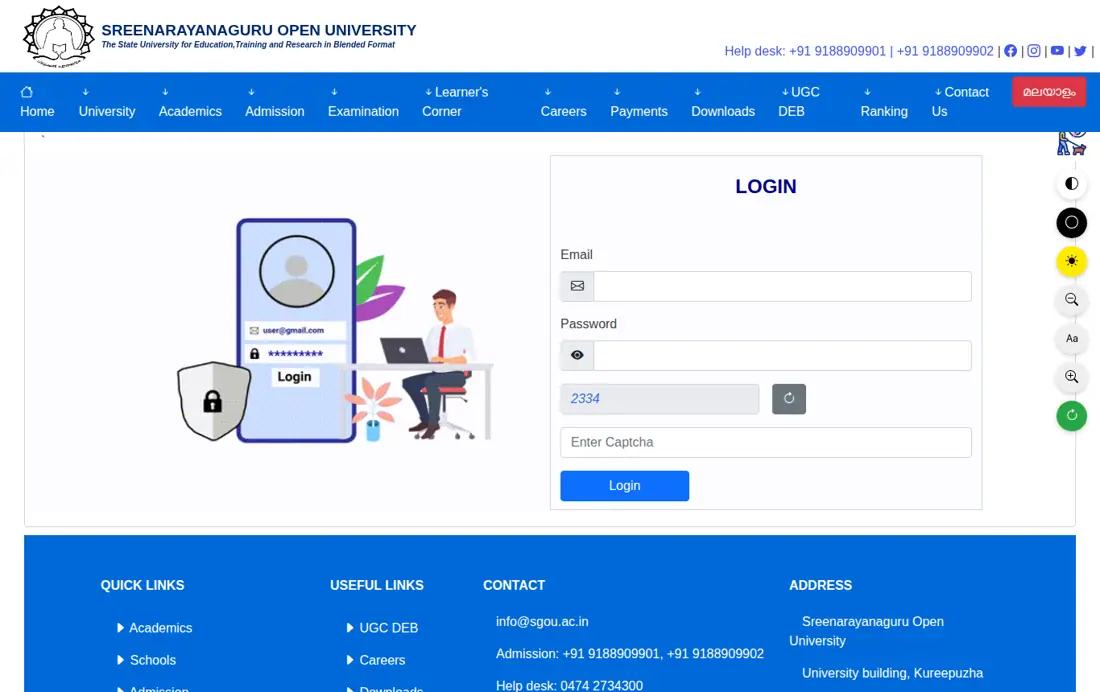
How to Log In to SGOU Student Portals?
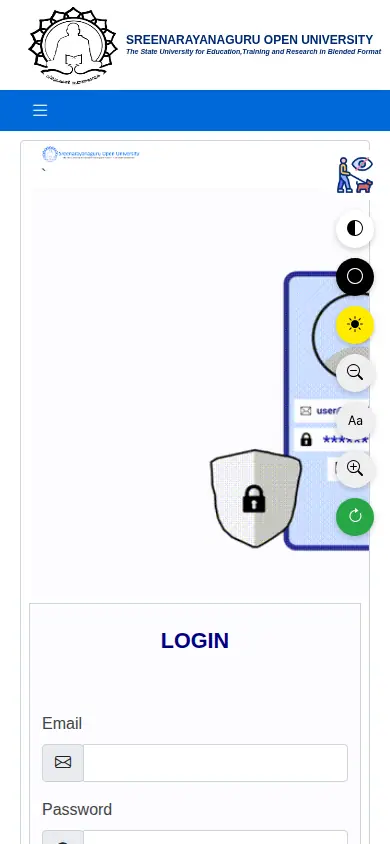
Students can log in to their Sreenarayanaguru Open University account using their registered email and password. This process grants access to their personal dashboard and application status. The login is facilitated through the dedicated Candidate/Student Login portal.
It is crucial for students to keep their login credentials confidential to prevent misuse of their information. Any sensitive details, such as OTPs, usernames, and passwords, should not be shared with others.
- Open the SGOU Candidate/Student Login page.
- Enter your registered ‘Email address’ in the designated field.
- Input your ‘Password’ (at least 8 characters) in the password field.
- Complete the ‘g-recaptcha-response’ verification.
- Click the ‘Login’ button to access your dashboard.
Key facts
- Candidate/Student Login Portal: https://erp.sgou.ac.in/login-candidate
- Official/Counsellor Login Portal: https://erp.sgou.ac.in/login-official
- ABC ID Creation Portal: https://www.abc.gov.in/
- DEB ID Generation Portal: https://deb.ugc.ac.in/StudentDEBId
- Online Fee Payment Modes: Debit Card, Credit Card, Net Banking, UPI
- Admission Session (Current): 2026 July-August session
SGOU ABC ID: Purpose and Creation Steps
The Academic Bank of Credits (ABC ID) is a unique identifier essential for students enrolling in Sreenarayanaguru Open University programmes. This ID facilitates the storage and transfer of academic credits earned by students across various higher education institutions. Students must create their ABC ID on the national ABC portal.
If a student already possesses a DigiLocker account, they can proceed directly to sign in. New users need to register by providing their mobile number and personal information, including Aadhaar details, to set up their account and generate the ABC ID.
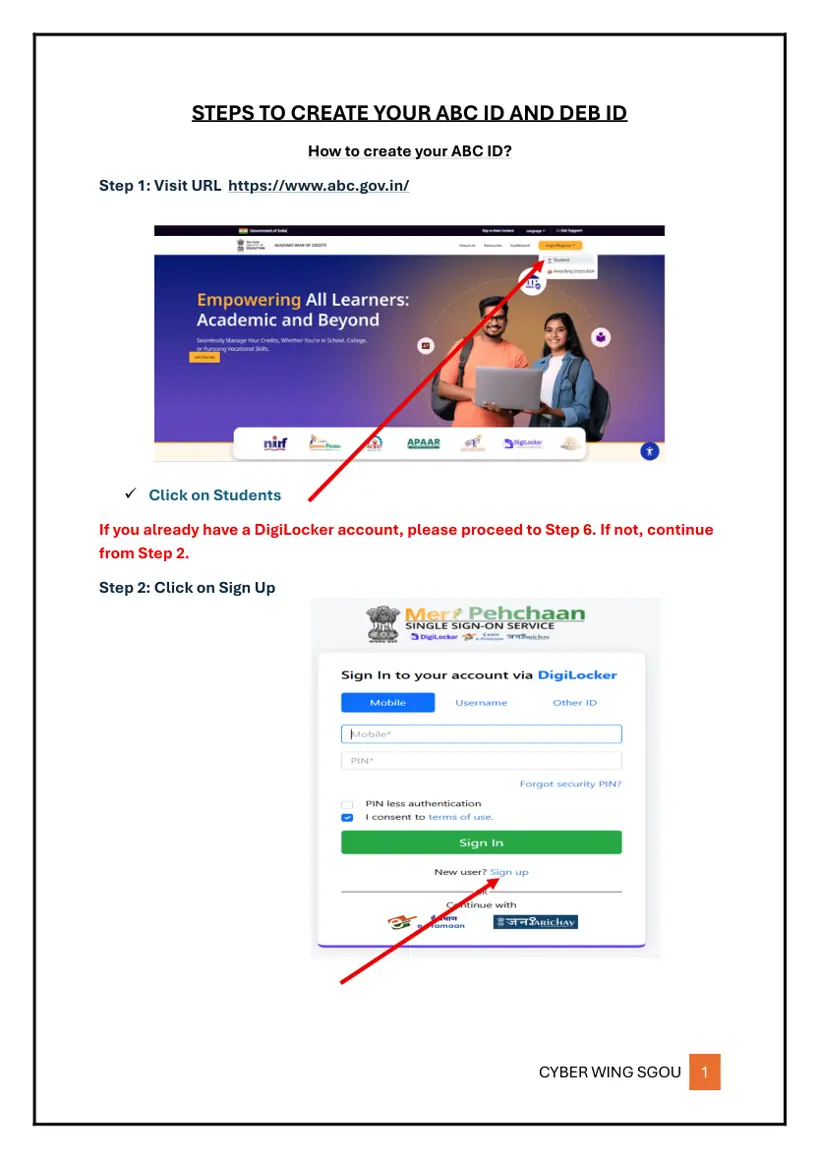
- Visit the ABC ID creation portal.
- Click on ‘Students’.
- If you do not have a DigiLocker account, click ‘Sign Up’.
- Enter your mobile number and click ‘Generate OTP’.
- Enter the received OTP and click ‘Verify OTP’.
- On the Personal Information Setup page, select ‘Aadhaar’ as the Document Type.
- Enter your Aadhaar number, name, Date of Birth, and select your Gender.
- Create a username and security pin, then re-enter the security pin.
- Check ‘I consent to terms of use’ and click ‘Verify’.
- If you have a DigiLocker account, select ‘Other ID’ to login, choose ‘Aadhaar’, enter your Aadhaar and pin, check ‘I consent to terms of use’, and click ‘Sign In’.
- After logging in, click the ‘Allow’ button.
- Fill out the form: Select ‘New Admission’ as Identity Type.
- Select ‘I am student at Sreenarayanaguru Open University’.
- Enter ‘2025’ as the Admission Year.
- Click ‘Submit’ to create your APAAR student account and generate your ABC ID.
- Click on ‘Dashboard’ to view your detailed information.
Other SGOU services students check
SGOU DEB ID: Generation Process
The Distance Education Bureau (DEB) ID is another crucial identifier for Sreenarayanaguru Open University students, linked to their ABC ID. This ID is generated through the UGC DEB portal. It helps in tracking student enrolment and academic progress within the distance education framework.
Students need their previously created ABC ID to generate their DEB ID. The process is straightforward and involves entering the ABC ID on the designated UGC DEB portal. The generated DEB ID is sensitive information and should be kept confidential by the student.
- Visit the DEB ID generation portal.
- Enter your ABC ID in the provided field.
- Click the ‘Enter Button’ to generate and view your DEB ID.
SGOU Online Admission Portal: Application Steps
Sreenarayanaguru Open University processes all admission applications digitally through its online admission management portal. This system aims to provide a hassle-free application and onboarding experience for prospective students. Applicants must follow a series of steps after logging into the portal.
The online application submission involves completing profile information, applying for a programme, adding qualifications, uploading supporting documents, selecting a Learner Support Centre, and choosing a counseling slot. The final step is fee payment, which confirms the application for admission.
- Log in to the admission portal using your credentials.
- Click on ‘UG/PG Programme’ to view available programmes.
- Click on the name of your desired programme to view its overview, outcome, curriculum, and fees.
- Click the ‘APPLY NOW’ button to submit an application for the selected programme.
- On the ‘Add Qualification’ page, enter essential qualifications and upload corresponding certificates.
- For PG programmes, ensure all required qualifications are added; for UG programmes, ensure two qualifications are added.
- Click ‘SAVE QUALIFICATION’ and then use the ‘upload’ button to attach supporting documents.
- On the ‘Upload Supporting Documents’ page, upload a passport-size photograph and a scanned copy of your signature.
- Upload identification documents, transfer certificates (mandatory for candidates below 45), and caste/income/NCL certificates if applicable.
- On the ‘Learner Support Centre Selection’ page, use the keyword search to find and select a Learner Support Centre (LSC) based on your convenience.
- Confirm your LSC selection, as it cannot be changed during the admission process.
- On the ‘Counseling Slot Selection’ page, pick a slot for physical verification of documents at the concerned Regional Centre.
- Preview your final application before proceeding to payment.
- On the ‘Fee Payment’ page, review the fee details, including any concessions for reservation categories.
- Complete the online payment using credit/debit card, UPI, or Net banking.
- After successful payment, generate and preserve the receipt for future correspondence.
SGOU Online Admission: Required Documents
During the Sreenarayanaguru Open University online admission process, candidates must upload several supporting documents to complete their application. These documents are crucial for verifying eligibility and identity. The system will list the specific documents required for each applicant.
Students are required to upload a passport-size photograph and a scanned copy of their signature. Additionally, identification documents, transfer certificates, and caste/income/NCL certificates are necessary, depending on the programme and candidate’s category.
- Passport-size photograph
- Scanned copy of signature
- Identification documents (six types listed by the system)
- Transfer certificate (mandatory for candidates below 45 years)
- Caste/Income/NCL Certificate (for candidates belonging to reservation categories)
SGOU Online Fee Payment: Accepted Modes and Charges
Sreenarayanaguru Open University requires all fees to be paid online. The payment gateway supports multiple convenient modes for transactions. Students will see the exact amount due for each service displayed on the screen before proceeding with the payment.
After a successful payment, students must generate and keep a receipt for their records. In case of any issues, such as not receiving a receipt or confirmation, students should contact the University office before attempting another payment for the same service.
SGOU Online Fee Payment Charges
| Payment Type | Charge/Rate |
|---|---|
| Debit card Rupay | NIL |
| Other Debit cards up to Rs 2000 | NIL |
| Domestic Credit card | NIL |
| Netbanking | NIL |
| UPI | NIL |
SGOU Learner’s Portal: Available Services
The Learner’s Portal on the Sreenarayanaguru Open University website serves as a central hub for various student-related services and information. This portal provides access to essential academic resources and administrative functions for distance learners. Students can navigate through different sections to find the information they need.
Key services available include access to syllabus, virtual content, and self-learning materials. Students can also find information related to examinations, make online payments, submit grievances, and access E-Grantz and anti-ragging circulars or registration portals.
- Syllabus
- Virtual Content
- Self Learning Materials
- Examination information
- Payments
- Grievance submission
- E-Grantz
- Anti-Ragging Circular
- Anti-Ragging Affidavit Registration Portal
SGOU Registration Status: Verification Process
After successfully applying for a programme at Sreenarayanaguru Open University, candidates can check their application status through their student dashboard. This dashboard provides updates on the application’s progress and any further instructions, including details about fee payment. The system updates the status as the application moves through different stages.
Students have the option to edit certain information in their submitted application before verification at the regional centre. Editable sections include detailed profile information, qualifications, supporting documents, Learner Support Centre information, and counseling slot details. Any edits are provided only after a request is received from the candidate.
- Detailed Profile Information
- Qualification details
- Supporting Document uploads
- Learning Support Centre Information
- Counseling Slot selection
SGOU Login Credentials: Unified Access
Sreenarayanaguru Open University uses an online admission management portal where applicants receive sensitive information like OTP, Username, and Password. These credentials are used for logging into the system to apply for programmes and manage their profile. The Candidate/Student Login portal also requires an email address and password.
SGOU Learner Support Centres: Selection and Contact
Learner Support Centres (LSCs) are crucial for Sreenarayanaguru Open University students, serving as locations for academic activities and counseling. During the online admission process, applicants must select an LSC based on their convenience. This selection is permanent and cannot be changed once confirmed.
The university provides a keyword search facility within the admission portal to help applicants find a suitable LSC. Each LSC has a coordinator with contact details, including a phone number and email address, available for inquiries between 10 AM and 6 PM.
Sample SGOU Learner Support Centres and Contacts
| LSC Name | Regional Centre | Coordinator Contact |
|---|---|---|
| Malik Deenar College of Graduate Studies, Kasaragod | THALASSERY | 9482474988 |
| Mahatma Gandhi College, Iritty, Kannur | THALASSERY | 9446111167 |
| NAM College, Kallikkandy, Kannur | THALASSERY | 9847617141 |
| M Dasan Arts & Science College, Ulliyeri, Kozhikode | KOZHIKODE | 9745378347 |
Common SGOU Questions
What is the official login portal for Sreenarayanaguru Open University students?
The official login portal for Sreenarayanaguru Open University students is the Candidate/Student Login page, accessible at erp.sgou.ac.in/login-candidate. Students need to enter their registered email address and password to log in. This portal provides access to their application status and other academic services.
How do I create my ABC ID for SGOU admission?
To create your ABC ID for SGOU admission, visit the Academic Bank of Credits portal at abc.gov.in. You will need to register as a new user by providing your mobile number for OTP verification and then entering your Aadhaar details and personal information. Existing DigiLocker users can sign in directly.
Where can I find my DEB ID for Sreenarayanaguru Open University?
Your DEB ID for Sreenarayanaguru Open University can be generated on the UGC DEB portal. Visit deb.ugc.ac.in/StudentDEBId and enter your previously created ABC ID in the specified field. The system will then display your DEB ID, which is sensitive information.
What documents are required for SGOU online admission?
For SGOU online admission, candidates must upload a passport-size photograph, a scanned copy of their signature, and identification documents. Additionally, a transfer certificate is mandatory for candidates below 45 years of age, and caste/income/NCL certificates are required for those in reservation categories.
Can I edit my SGOU application details after submission?
Yes, you can edit certain details of your SGOU application after submission but before verification at the regional centre. Editable sections include detailed profile information, qualifications, supporting documents, Learner Support Centre details, and counseling slot. Any edits are processed upon request from the candidate.
Are there any charges for online fee payment at SGOU?
No, Sreenarayanaguru Open University does not levy any charges for online fee payments made via Debit card (Rupay and other cards up to Rs 2000), Domestic Credit card, Netbanking, or UPI. The amount displayed on the screen is the exact fee to be paid for the service.
How do learners access the L Desk help desk for Sreenarayanaguru Open University (SGOU)?
The official L Desk help desk web address for Sreenarayanaguru Open University is http://www.content.sgou.ac.in/. Students can access this online help desk facility during the designated contact hours from 10 AM to 5 PM. For center-specific support, learners may also contact their designated Learner Support Centre coordinators, whose operational hours are 10 AM to 6 PM.
What credentials are required to log in to the Sreenarayanaguru Open University (SGOU) candidate portal?
Students must log in to the SGOU Candidate Login portal at erp.sgou.ac.in/login-candidate using their registered email address and a password of at least 8 characters. The login process also requires completing a g-recaptcha image verification. Candidates must keep their password confidential to protect personal information.
How should students configure their identity details when creating an ABC ID for SGOU?
On the Academic Bank of Credits portal form, applicants must select New Admission as the identity type and choose Sreenarayanaguru Open University. Students should then enter 2025 as the admission year before submitting the form. Completing this step generates the APAAR student account and ABC ID.
What academic qualification documents must PG applicants upload on the SGOU portal?
Postgraduate applicants must add three qualification levels on the SGOU portal: 10th level, Plus 2 or HSE equivalent, and Degree level. Candidates must upload the supporting certificate for each added qualification before moving to the next tab. Missing any of these three qualifications prevents moving to subsequent admission steps.
How can candidates select a Learner Support Centre during SGOU online admission?
Candidates select a Learner Support Centre by using the keyword search feature on the SGOU online admission portal. The chosen centre becomes permanent once confirmed and cannot be changed during the admission process. Applicants can contact designated LSC coordinators between 10 AM and 6 PM for guidance.
Where to Go on the SGOU Site
- Log in to SGOU Learner’s Portalerp.sgou.ac.in ↗
- Access SGOU Official/Counsellor Loginerp.sgou.ac.in ↗
- Explore SGOU Student Corner servicessgou.ac.in ↗
- Find SGOU Learner Support Centressgou.ac.in ↗
Notices and Documents from SGOU
- SGOU User Manual for ABC ID and DEB ID Creation PDF — User Manual for ABC ID and DEB ID creation
- SGOU Online Admission Portal Applicant User Manual November 2022 PDF — User Manual for SGOU Online Admission Portal
In this section
- Sreenarayanaguru Open University Student Login: SGOU Password Reset & Recovery
- L Desk SGOU Login, Candidate Portal and Student Support
- How to Apply for an SGOU Provisional Certificate Online
- SGOU Name Correction Form: Process, Portal Link, and Rules
Everything on SGOU Student Services
Scholarship
Certificates
ID & Login
- L Desk SGOU Login, Candidate Portal and Student Support
- Sreenarayanaguru Open University Student Login: SGOU Password Reset & Recovery