
SGOU Result 2026: How to Check Your Grade Card and Marks Online
SGOU declared the first-semester regular results for B.Sc. Data Science & Analytics July 2025 intake VI on 13 November 2026 via the SGOU examination result portal. Distance learners can check UG and PG examination marks using registration details. Revaluation and improvement services are accessed through the SGOU learner IRS grade card portal.
Contents
- SGOU Alerts & Notifications
- SGOU Exam Results Declared in November 2026
- SGOU Results Cover UG, FYUGP and PG Programmes
- SGOU Result Portal Links and Payment Modes
- How to Check the SGOU Result Online
- SGOU Grade Card Shows Marks, Grades and SGPA
- SGOU Result Fee Payment Failures and Receipts
- SGOU Revaluation and Improvement on the IRS Grade Card Portal
- SGOU ABC ID and DEB ID Setup Steps
- Where to Go on the SGOU Site
- Official SGOU Documents (PDF)
- Frequently Asked Questions
- In this section
SGOU declared B.Sc. Data Science & Analytics first-semester results for July 2025 intake VI on 13 November 2026. Fourth-semester PG regular results for July 2024 intake V were published by SGOU on 11 November 2026. SGOU announced fifth-semester UG results for BBA and BCom July 2023 intake III candidates on 7 November 2026. Online fee payments for SGOU revaluation and result services carry zero transaction charges across UPI, Net Banking, and Debit Cards. Learners must link their SGOU student registration with ABC ID and DEB ID on the UGC portal.
ഈ വിവരങ്ങൾ മലയാളത്തിൽ വായിക്കുക
Sreenarayanaguru Open University (SGOU), also known as Sree Narayana Guru Open University, publishes undergraduate (UG) and postgraduate (PG) term-end examination results on its official website sgou.ac.in. Candidates enrolled in 3-year UG, 4-year FYUGP, and 2-year PG degree programmes access semester marks, assignment results, and grade cards online. Results are out for Intake III (July 2023), Intake IV (January 2024), Intake V (July 2024) and Intake VI (July 2025), the newest batch. Learners log in to view term-end performance, download digital marksheets, and request improvement or revaluation through dedicated university portals.
SGOU Exam Results Declared in November 2026
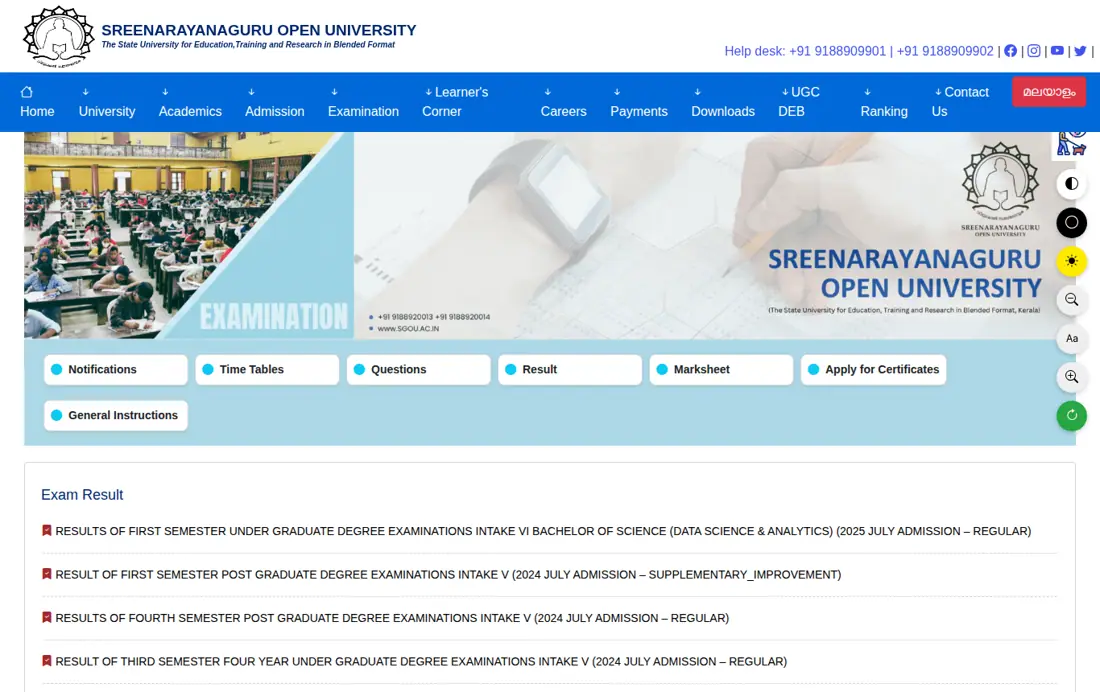
SGOU declared the B.Sc. Data Science & Analytics first-semester regular results for July 2025 admission intake VI on 13 November 2026. Students can access their marks online through the official SGOU examination result portal.
Intake VI (July 2025 admission) now has its first result: the B.Sc. Data Science & Analytics first semester. The fourth-semester PG regular result for Intake V followed on 11 November 2026, and the fifth-semester BBA and BCom result for Intake III on 7 November 2026.
SGOU Results Listed on sgou.ac.in (November 2026)
| Programme and Semester | Intake | Admission Session | Exam Type |
|---|---|---|---|
| B.Sc. Data Science & Analytics, Semester 1 | Intake VI | July 2025 | Regular |
| PG degree programmes, Semester 1 | Intake V | July 2024 | Supplementary / Improvement |
| PG degree programmes, Semester 4 | Intake V | July 2024 | Regular |
| Four-year UG (FYUGP), Semester 3 | Intake V | July 2024 | Regular |
| UG BBA and BCom, Semester 5 | Intake III | July 2023 | Regular |
| PG degree programmes, Semester 1 | Intake I | 2022 | Supplementary |
| PG degree programmes, Semester 3 | Intake V | July 2024 | Regular |
| UG degree programmes, Semester 1 | Intake I | 2022 | Supplementary |
| UG BBA and BCom, Semester 4 | Intake III | July 2023 | Regular |
| UG degree programmes, Semester 2 | Intake IV | January 2024 | Supplementary / Improvement |
Key facts
- Latest Result Released: B.Sc. Data Science & Analytics Sem 1 (July 2025)
- PG Result Session: PG Sem 4 Regular (July 2024 Intake V)
- UG Result Session: UG Sem 5 BBA & BCom (July 2023 Intake III)
- Official Result Portal: sgou.ac.in/examination/result
- IRS Portal Link: dms.sgou.ac.in/ciep/public/learner-irs-gradecard
- Online Fee Charges: Rs 0 (Debit Card, Credit Card, Net Banking, UPI)
SGOU Results Cover UG, FYUGP and PG Programmes
SGOU publishes semester examination results and assignment evaluations online through its primary domain sgou.ac.in and ERP portal. Learners enrolled in 3-year UG, 4-year FYUGP, and 2-year PG programmes check results using official learner logins.
Result declarations cover regular, supplementary, and improvement examinations across all Kerala learner support centres. Assignment marks and internal continuous evaluation grades are integrated into the final semester grade card.
- 3-Year UG Programmes: Bachelor of Arts (BA), BBA, BCom, BCA, B.Sc Data Science & Analytics
- 4-Year FYUGP Programmes: BA English, BA History, BA Malayalam, BA Sociology, BBA, BCom
- 2-Year PG Programmes: MA English, MA History, MA Sociology, MBA, MCom, MCA
SGOU Result Portal Links and Payment Modes
SGOU processes semester results online without charging additional gateway fees for digital mark verifications or result service applications. All candidate transactions must be completed electronically using approved digital payment channels.
Students checking results for recent sessions including 2023, 2024, and 2025 intake batches require their valid enrolment credentials. Official grade card records are archived across university server pages.
SGOU Result Portal Key Information
| Feature / Parameter | Official Details / Portal Link |
|---|---|
| Official Website | sgou.ac.in |
| Result Search Portal | sgou.ac.in/examination/result |
| IRS & Grade Card Portal | dms.sgou.ac.in/ciep/public/learner-irs-gradecard |
| Learner Login Portal | sgou.ac.in/student-corner |
| ERP Admission Portal | erp.sgou.ac.in |
| Accepted Payment Modes | Debit Card, Credit Card, Net Banking, UPI |
Other SGOU services students check
How to Check the SGOU Result Online
Learners can access their SGOU examination results directly on the official portal by following a structured multi-step search process. Enrolled candidates must keep their registration details ready before accessing the result links.
- Open the official SGOU examination result portal at sgou.ac.in/examination/result.
- Locate your programme and semester notification from the published result list on the page.
- Click on the specific examination result title corresponding to your admission intake and session.
- Log in using your registered candidate credentials on the SGOU student login portal.
- View your detailed semester marks, subject-wise grades, and qualifying status on screen.
- Download and save the digital result statement or grade card for future reference.
Learners who checked their SGOU semester examination results should download their digital mark statements and verify subject grades. Candidates requiring revaluation or supplementary appearance must submit online fee requests via the official portal by the published university deadlines.
SGOU Grade Card Shows Marks, Grades and SGPA
The SGOU online grade card displays comprehensive candidate details alongside course-wise assessment marks and semester grade points. Learners must verify all printed personal and academic entries immediately after downloading.
- Candidate Full Name and Enrolment Registration Number
- Programme Name (e.g. Master of Business Administration or Bachelor of Commerce)
- Semester, Admission Year, and Intake Batch Number (e.g. Intake V July 2024)
- Subject Codes and Title Names for Core and Elective Courses
- Continuous Internal Evaluation (CIE) and Term-End Examination (TEE) Marks
- Subject-wise Letter Grades, Credit Points, and Semester Grade Point Average (SGPA)
- Final Examination Result Status (Pass, Fail, or Supplementary)
SGOU Result Fee Payment Failures and Receipts
Candidates making online fee payments for SGOU result services must generate and preserve official payment receipts for university records. The university charges zero processing fees for UPI, Net Banking, and Rupay Debit Card transactions.
If a payment confirmation receipt is not generated after completing an online fee transaction, candidates must contact the SGOU office before making a duplicate payment attempt. Fee refund and cancellation requests are processed directly by the SGOU University Office contact page.
None of the five payment modes carries a service charge: RuPay debit card, other debit cards up to Rs 2,000, domestic credit card, net banking and UPI.
SGOU Revaluation and Improvement on the IRS Grade Card Portal
SGOU candidates seeking mark improvement, supplementary exams, or revaluation can access the dedicated IRS grade card system. Revaluation and improvement applications are processed through the SGOU learner IRS grade card portal.
Learners submit revaluation requests online and pay the designated fee via Debit Card, Credit Card, Net Banking, or UPI. Successful applications update official learner grade card records upon re-evaluation completion.
SGOU ABC ID and DEB ID Setup Steps
SGOU learners must register an Academic Bank of Credits (ABC) ID and Distance Education Bureau (DEB) ID for digital credit transfer. The university provides an official SGOU ABC ID and DEB ID manual (PDF) detailing Digilocker and UGC DEB registration.
- Visit the official Academic Bank of Credits portal at abc.gov.in.
- Click on Students and sign up or sign in using your Aadhaar number and DigiLocker pin.
- Complete personal information verification and select Sreenarayanaguru Open University as your institution.
- Select your admission year as 2025 and submit the form to generate your 12-digit APAAR or ABC ID.
- Navigate to the UGC DEB portal at deb.ugc.ac.in/StudentDEBId.
- Enter your generated ABC ID and click Submit to obtain your official DEB ID.
Common SGOU Questions
How are SGOU BCA semester results published?
SGOU publishes BCA semester results at sgou.ac.in/examination/result. Select your programme and intake, log in to the student portal with your registration details and download the result statement. Revaluation and supplementary requests go through the IRS grade card portal at dms.sgou.ac.in.
How can students check the SGOU PG result?
SGOU declared the fourth-semester PG regular result for Intake V (July 2024 admission) on 11 November 2026. PG learners check marks at sgou.ac.in/examination/result or in the learner login at sgou.ac.in/student-corner, using their enrolment details.
Where is the SGOU first semester result 2025 published?
The first-semester result for B.Sc. Data Science & Analytics, Intake VI (July 2025 admission), was declared on 13 November 2026. It is on sgou.ac.in/examination/result, where learners view subject-wise grades and download the mark statement.
Is the SGOU result available on erp.sgou.ac.in?
No. erp.sgou.ac.in handles admission profiles, document uploads and admission fee payments. Term-end results appear at sgou.ac.in/examination/result, and continuous evaluation grades show in the learner login at sgou.ac.in/student-corner.
How do candidates apply for SGOU revaluation or a grade card?
Revaluation, supplementary and grade card requests are filed online at dms.sgou.ac.in/ciep/public/learner-irs-gradecard. Fees are paid by RuPay debit card, credit card, net banking or UPI with no service charge. Save the payment receipt as soon as the payment is confirmed.
Where can learners find SGOU results of older sessions?
Older results stay listed session-wise on sgou.ac.in/examination/result, for example the fifth-semester BBA and BCom result for Intake III (July 2023 admission). Log in with your enrolment details to view grades. If an archived record does not load, contact the SGOU office.
What should candidates do if an SGOU result fee payment fails?
If no confirmation or receipt appears, contact the SGOU office before paying again. Keep the transaction ID so a double deduction or a failed payment can be traced. Refund and cancellation requests are handled by the university office.
Why do SGOU learners need an ABC ID and a DEB ID?
UGC rules require every SGOU learner to hold an ABC ID and a DEB ID so that credits are recorded against the degree. Create the ABC ID on abc.gov.in with Aadhaar and DigiLocker, then enter it at deb.ugc.ac.in/StudentDEBId to get the DEB ID.
What is printed on the SGOU grade card?
The grade card shows the learner’s name, enrolment number, programme, semester and intake, followed by course codes and titles, CIE and TEE marks, letter grades, credit points, SGPA and the final result status.
How is the SGOU PG supplementary and improvement result announced?
The first-semester PG supplementary and improvement result for Intake V (July 2024 admission) was declared on 7 November 2026. Open sgou.ac.in/examination/result, choose the supplementary result notice and log in with your enrolment details.
What fee is charged on SGOU result service payments?
SGOU adds no transaction charge to result service payments made by RuPay debit card, other debit cards up to Rs 2,000, domestic credit card, net banking or UPI. Applicants pay only the service amount shown on the IRS portal.
Where to Go on the SGOU Site
- Check semester examination results onlinesgou.ac.in ↗
- Apply for IRS supplementary and revaluation grade carddms.sgou.ac.in ↗
- Access learner login and profile dashboardsgou.ac.in ↗
- Contact university office for fee troubleshootingsgou.ac.in ↗
Official SGOU Documents (PDF)
- SGOU User Manual for ABC ID and DEB ID Creation PDF — User manual for creating ABC ID and DEB ID for SGOU learners